Friday, January 16, 2015

OWASP Attacks Part 2 - Exploitation of Authentication

Moved to New Site

Cross-Site Request Forgery (CSRF) aka One-Click attack
The goal of a CSRF is not to steal information directly, but to force a user into performing actions that they are unaware of.
A cornerstone premise for this attack is that a site/application that you are logged into will perform all actions as you since your credentials are already stored via cookie or session variables.
For example,
Say an attacker knows Dennis uses Bank of Canada's web site.
Say the attacker knows of a CSRF vulnerability on the BOC website that can be performed with URL manipulation, something like this:

www.bankofcanada.com/transfer.php?account=5555&amt=400

If Dennis is logged into his BOC account and visits this link, 400 of his hard earned loonies are transferred over to the owner of account number 5555.
How can we get Dennis to visit this link?
We could XSS a site that he regularly visits, or we could use the company email that allows HTML, something like

<a href="https://www.blogger.com/www.bankofcanada.com/transfer.php?account=5555&amt=400">Look at this stupid cat!</a>

Dennis' insatiable love of cats just cost him $400.
There are countless ways of getting a person to click on a link. People hate blue links.

You should check your site to ensure there is not functionality that can be initiated purely from the URL or from any GET commands.

To detect this vulnerability you can set up a proxy between a browser and the site and examine the requests being made and then try to inject those same requests when logged in as another user.

There are a lot of ways that a site can defend its user base from such attacks. The most simple is to enforce session time out for users that are logged in, this is by no means a catch all, but it will help.
The best defense is to implement a  Synchronizer Token Pattern.
A random token is generated and included in forms/procedures of a site that ensure that a request to that functionality came from the site itself and not from an outside link/script.

Session Hijacking
When you log into a web site or web application the server needs to keep track of who you are, it does this by creating a Session ID. A session ID is a long string of alpha-numerical characters that is unique to your session with the server.
A session hijacking attack occurs when it is possible for an attacker to successfully obtain your session id or guess a future session id.

A session id can be stolen from network sniffing, a man-in-the-middle attack, cookie stealing, or XSS.
Once stolen an attacker can use a site/application while masquerading as the victim.

To help prevent session hijacking be sure your site has an up to date certificate and supports use of HTTPS.
Use a long, random session id, do not use something predictable such as the user id.
Do not reuse session ids.
Encourage users to log off after they are finished and include session timeout functionality, this will help prevent hanging sessions.


Monday, January 5, 2015

OWASP Attacks Part 1 Abuse of Functionality

MOved to New Site

If you are getting into security you should be very familiar with OWASP (Open Web Application Security Project.) They provide a huge amount of information about securing and attacking web applications. This series will glaze over all the attacks listed on their site and serve as either notes or primer info.

Abuse of Functionality
This occurs when an attacker can use a specific feature in your web application to meet an effect that you did not intend.

Account name harvesting
Most sites include a form that can be submitted to request a new password to be emailed to you if you have forgotten your creds. The form is normally just an email address or a user name input box and a submit button.
After this form submission they site responds in one of two ways
1. 'No account associated with that email/username' or 'User is not found' type of message
2. 'Password sent, please check spam filter' or 'A link to update your password has been sent'

This is improper, no matter if a username/email has a valid account on your system your page should always respond that consistently.
If not, you run the risk of an attacker abusing the functionality and harvesting a list of valid user names/emails that take use of your services.

This might not seem like much, but you will want to implement it to help fight against data aggregation

Single User DoS
Most sites will implement a three strike rule when it comes to logging in; Enter the wrong creds three times and there will be a temporary lock on the account or it will send email to the user to reset their password.
This is a feature that is implemented for the point of protecting us from password guessing attacks, but if an attacker knows a user that he needs disabled for a few minutes, he may just submit three false log ins for that account and let the system block his access for you?

Path Traversal
The goal of a path traversal is to point the application to the disk unkown, outside of the web root and into other roots.
The most ubiquitous tool for this is ../
This is the symbol used to move up one directory level.
It is most commonly done through URI manipulation, but can also be done with cookie manipulation.
Take a look at the url below:

http://noparse.com/load.php?get=/var/www/html/get.php

We could alter it:
http://noparse.com/load.php?get=../../../../../../../etc/passwd

Now this is just to give you a taste of how this attack works, and by no means exhaustive list, you are just one google search away from that:

Pro Tip: A fun way to look for these is with google, search for "inurl:'some directory'"

Client Side
This cannot be said enough, know the difference between client side and server side. All too often developers do not have a holistic view of their web app. Any verification of data integrity or character escaping you do on in client side languages can be bypassed 100% with zero effort on the attacker's part.
Always verify data on the server side.
Burn that phrase into your brain.

Wednesday, December 10, 2014

Wireshark - Lesson 1

Moved to New Site

Wireshark is the go to network traffic analyzer for enthusiasts, it is a robust program with a lot of options and settings available to the user, so it will be covered in a handful of lessons.

First, you can download it here.
https://www.wireshark.org

So after you fire up a capture you will get a screen full of packets pretty quickly. An intimidating amount of packets. So first we will talk about some ways to drill down this pile.

Handy Filters to begin with

The most important filter IMHO is
ip.addr == 0.0.0.0
This filter will only show packets that have the provided IP address in either the source or the destination of the packet. This makes it easy to get a look at a single conversation.'

Sort by the port with this:
tcp.port == 443

Looking at Logins

Now I did a log in on a site that does not have a certificate to show you how the log in information is sent in clear text across the Internet.


Above is a look at some of the packets.
But I know we captured a log in attempt, so lets try to find it.

Know this, you cannot create a filter based on the contents of the Info column.
If you want to search the Info column either CTRL+F or Edit->Find Packet...
Search in Packet Details or Packet Bytes.
edit->find packet


 This grabbed the packet that I already had highlighted above. We can pop it open and look inside.
my exposed creds

Here we can see under the Form URL Encoded section is a nicely laid out section where my log in creds are displayed.

Here is what it what it would look like in a site that encrypts your creds.
what stuff

encrypted data

You can see that this packet was sent as a TLS protocol, everything was encrypted, but I assume this is the log in information since it was the biggest packet coming from my source.
Look at the highlighted information above and notice how you cannot make out what the user name is. Thanks HTTPS.

Web Search Queries

Search queries are often not encrypted, Google does now encrypt by default, but Bing, Baidu, Naver, and Xu do not.

Packets carrying search queries look like this:

search packet example

You can see the search query nested in the GET request highlighted below.

highlighted query


Some Background

Each packet is encapsulated inside of a frame that states the packet's destination your NIC (Network Interface Card) will read packets that comes across the line, and if it sees a packet is not intended for that particular NIC it will stop reading the packet and move on to the next.
This is the default setting for the sake of speed, so if you want your NIC to analyze the entire breadth of packets coming on the line you need to change the default setting of your NIC to promiscuous mode, this is done by default in Wireshark, you can see the setting under Capture Options:


Sunday, November 30, 2014

John the Ripper (Windows Target)

New Site

Because there needs to be at least one more John the Ripper tutorial out there.
Author page: http://www.openwall.com/john

This is probably one of the most ubiquitous programs for cracking passwords out there, but I'll try to go into a little more detail than the average JTR tutorial.

df -k to figure out where the drive went
Looks like it already popped up.

see the drive
Point yourself to windows/system32/config

dir change
bkhive system /root/hive.txt
bkhive is used to extract the system's boot key.


To each iteration of Windows is a unique boot key that is used to encrypt a different set of hashes created by the user passwords before they are stored in the SAM database.
Try and read that sentence again while looking at the graph. Then it might make sense.

graph

samdump2 SAM /root/hive.txt > /root/hash.txt
This uses the system key we got above and the SAM database to reconstruct the user created hashes.
find the hash
Here you can see the output
output
john /root/hash.txt -format=nt2
Now to kick off John The Ripper and wait for results.
JTR

You can see that it created a directory at /root/.john you can monitor john.log while you wait for the results to appear in john.pot
Like so many others, this password popped in less than a second, a four character password, all numeral.
7957

Please note the alternate john prompt. I have added the options -users and -w, short for wordlists.
You can specify for john to only work on one user account, and you can use custom wordlists to help speed up the process.
Dictionary > Brute Force.

Monday, November 24, 2014

DF - photorec in Kali

Moved to New Site


Grabbed a used laptop hard drive and now I'm going to teach you fools how to carve files and restore their goodlyness.

Here are the authors of this tool
www.cgsecurity.org
It is available for Windows, Man, and Linux.

Tutorial will be in Kali Linux.

I'm poor and don't have a usb to sata cable so I'll map it through VMWare to my Kali image.
After Kali boots up, mount the drive
mount -t ntfs /dev/sdb2 /mnt/sdb2
Next we will make a place to house the carved files
mkdir /tmp/carved

Pull up photorec.
photorec

You will get a screen like this, with a drive selection. I pick the laptop hard drive.
pick a drive

Next screen is where we can select which partition on the disk we want to dig into. It is also where we get into some important settings. (Options, File Opt)
step 1

Inside the Options menu, you'll see these few. Personally I think the 'Keep corrupted files: Yes' is the most important, it is No by default, but this is where we can get our deleted information.
Set up the options how you want, then hit quit, it brings you back to the Main Menu.
choptions

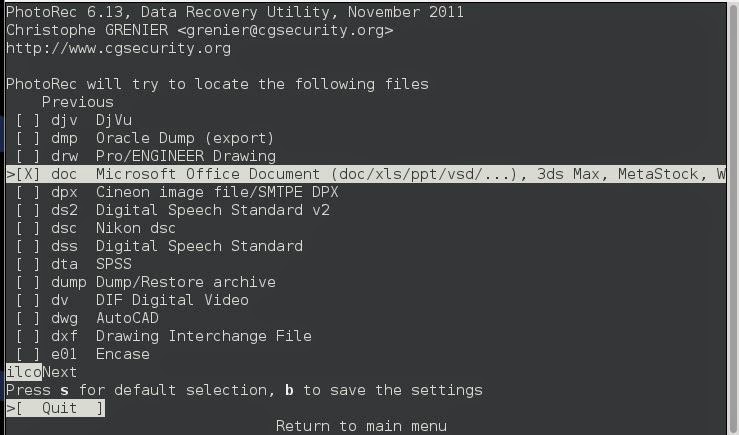
Inside the File Opt menu you have a big list of all the support files that photorec can recover.
These are the file types that photorec has the metadata information for and knows how to recognize them by the file signature.
I only select the Microsoft Office as I am using a virtual machine and don't have much storage.

Pick a directory where you want photorec to put its findings.

directory


Here you will pick the block size. The default for NTFS is 4KB, so we will leave it at that. If you want to read more about that check Here
 
4kb block

Now you'll pick if you want only Whole files or Partial files, since we are digging for deleted items, we want the data that is in the Free space.

free data free pie

Go get coffee, cause it will take a while to run.
...........................
...........................
Several 'little bits' later
...........................
...........................
138 files found
My little Virtual Machine is filled up with files.
So lets see what we have gotten!


root@kali:# cd /tmp/carved
root@kali:/tmp/carved# cd recup_dir.1
root@kali:/tmp/carved/recup_dir.1# ls -ltr -S


carved files

Now, I dug through these files and didn't find anything of interest, so I went back and changed a few options and started another search so we could have an example of something fun to pull from a disc.

I stopped it after 1000 files where pulled.
First thing to grep for is this
Here you are using the power of Regular Expressions to Social Security numbers:
grep -nr "[0-9]\{3\}-[0-9]\{2\}-[0-9]\{4\}" .

Grepping for credit card numbers:
grep -nr "[0-9]\{4\}-[0-9]\{4\}-[0-9]\{4\}-[0-9]\{4\}" .
grep -nr "[0-9]\{4\} [0-9]\{4\} [0-9]\{4\} [0-9]\{4\}" .


You can use regular expressions to find anything particular that you are looking for.
I didn't find anything too fun on this drive, but I did find out this user had a Fate manual.
fate manual pdf

-----------------------------------------------------------------------------------------------------------------
-----------------------------------------------------------------------------------------------------------------
-----------------------------------------------------------------------------------------------------------------
Why is it possible to find old deleted files?
A kindergarten explanation and a kindergarten example.
When a file is written onto a hard drive it is going to take up an amount of physical space.

Imagine each bit (1 or 0) takes up one centimeter off disk space.
And imagine a file takes up 2 meters of disk space, starting at a particular address.
When a user deletes a file, the computer just marks the space as available to be overwritten, it does not actively destroy all of the data.
If none of the 2 meters of data is not overwritten, then the entire file can be reconstructed, even though a person cannot see it when using the operating system.

If the first meter is over written with a different file, then the last meter of the old file is still available. This is known as latent data. Even though it is not the full file, it could still contain evidence or sensitive information.

Tuesday, November 18, 2014

Policy - Hiring Procedures

Moved to New Site

I am not a lawyer, taking legal information from a random blog is a stupid idea. You agree that I will not be held accountable for your bad decisions.

When your business grows beyond what you can you alone, you will need to hire a schmo to help you out. Before you even think about filing a want ad, you should create a hiring policy for your business. The policy you create should cover the legal, financial, and security aspects of bringing in a new employee.
The SBA has an excellent step by step Here. This post is assuming you have already read the SBA's page and will focus on security.

The following are some  recommendations to add to your hiring procedures to make it as secure as possible:

Interview Location:
If you run your business alone and you are going to be interviewing strangers the standard safety procedures should be taken when meeting any stranger.
Meet in a public place, i.e. restaurant, coffee shop.
Let a 3rd party know where and when you will be meeting the interviewee.

Education:
To verify a college education you can either request a transcript from the applicant or you can contact their college's registrar's office to verify degrees and attendance. The registrar's contact information will be available on their web site.

Drug Testing:
First of all know your drug testing laws, Here. Search for a local drug test provider and inquire about setting up a program for your business.

Citizenship
There is the regular I-9.pdf Check out the USCIS web site, here they offer the E-Verify program, How it works. And if you are interesting in sponsoring a work visa here is a brochure.

References:
Be sure to ask for references, if they give you only personal references, ask for business/supervisor.
If this is their first job, see if you can get someone from their extracurriculars or volunteer work.

NDAs and Eithics Policy:
If you have an NDA and/or ethics policy in place, be sure you have the candidate review  and sign in to it.

Sleuthing:
Check your applicants Facebook, Twitter, Google+, and LinkedIn accounts.
Do a web search for "First name last name town"
See if you can find their handle, name used online. Search with that to find less mainstream accounts created under the same name.
Search their email address to the same effect.
https://pipl.com/ can also grab some info, but I've never had much luck with it.

Criminal Background checks:
It is good to know if you are hiring a person with a violent criminal history. There are some free services below to aid you in your search.
Do know that there are laws that protect privacy. Here, Section 3 You should be aware of the Fair Credit Reporting Act (FCRA), it has several statements that you should know about concerning how you can conduct your background test depending on the salary and the state you are in.

Here is an depository of links various states' information about  conducting public records searches.

Online Search
-------------------
Alaska - Here
Arizona - Here
Arkansas - Here
Connecticut - Here
Delaware - Here
Hawaii - Here
Idaho - Here
Illinois - Here (Not all counties are available)
Indiana - Here
Iowa - Here
Kentucky - Here
Louisiana - Here
Maryland - Here
Michigan - Here
Minnesota - Here
Mississippi - Here
Missouri - Here
New Jersey - Here
New Mexico - Here
New York - Here
North Carolina - Here
North Dakota - Here
Ohio - Here
Oklahoma - Here
Oregon - Here
Pennsylvania - Here
Rhode Island - Here
Tennessee - Here
Virginia - Here
Washington - Here
Wisconsin - Here

Find out if a person is on probation/in custody
-----------------------------------
VINE

Paid Online Search
----------------------
Alabama - Here for $9.99 per search or
    Here for a start up cost of $150 and a monthly fee.
Colorado -According to their site here: Here
     you must use this site: $7 a search: Here
Kansas - $1/search and $1/result Here
Maine - $30 a pop Here
Nebraska - $15 Here
South Carolina - $25 Here
Utah - Paid subscription Here
Vermont - $12.50 Here

Mail In Form
---------------
South Dakota - Here

Special Case
---------------
Massachusetts - only on specific computers Here
Nevada - (clark County only) Here
New Hampshire - some info, no full search available Here

Unkown/Didn't Find
--------------------
California
Florida
Georgia
Montana
Texas
West Virginia
Wyoming